Your recorder was discontinued.
Your cameras still work.
Hikvision and Dahua recorders are vanishing from the U.S. market — discontinued lines, federal restrictions, and replacement hardware that locks you to one brand. When the recorder fails, most installers quote a full rip-and-replace. You don't need one. Your cameras are fine; the box behind them is the problem.
Running a big-name enterprise VMS instead? The case is just as strong: fewer false alarms, faster investigations, and no per-camera license treadmill — often on the server hardware you already own.
Drop-in replacement
TechPro Vision connects to your existing IP cameras over the same protocols they already speak. Swap the recorder, keep the cameras, keep the wiring.
One system for mixed fleets
Hikvision on the warehouse, Dahua at the gate, Axis in the lobby — every brand lands on one wall, one timeline, one search box, one app.
Specialty cameras welcome
LPR, thermal, and facial-detection cameras come along too — we build custom integrations for almost any specialty camera, so it lands on the same wall, alarms, and search as everything else.
Before an alarm reaches you,
an AI has already looked at it.
Ordinary motion rules can't tell a burglar from a delivery driver. TechPro Vision can. Every alarm candidate is reviewed by AI before your phone buzzes — and when it does buzz, the message tells you why in one sentence.
Vehicle detected ON-BOX · FREE
The recorder's own GPU spots a vehicle entering the frame. Zone, schedule, and movement filters run first, free — most passing traffic ends right here, with no AI spend at all.
AI screening AI LOOK
The AI compares event snapshots against a reference frame of the same scene from before the event, so it judges what changed. Its call: A dark van entered the driveway from the street and stopped near the house.
Deep review AI LOOK
A stronger model re-reviews frames from across the whole event before any text or call goes out. Confirmed: A blue service van pulled onto the brick paved driveway entrance from the street.
Your phone buzzes SENT
The snapshot rides along in the message. Voice calls speak the same sentence. 36 seconds from first frame to phone, reviewed twice on the way.
AI review only ever removes noise. If the cloud is unreachable or a check errors, the alarm fires anyway, unreviewed. An outage can never eat a real alert — that behavior is built into the recorder, not a policy.
Three verdicts from one afternoon.
Real events from a production recorder, captured the day this page was updated. The italic line on each card is the AI's own reasoning, exactly as logged.
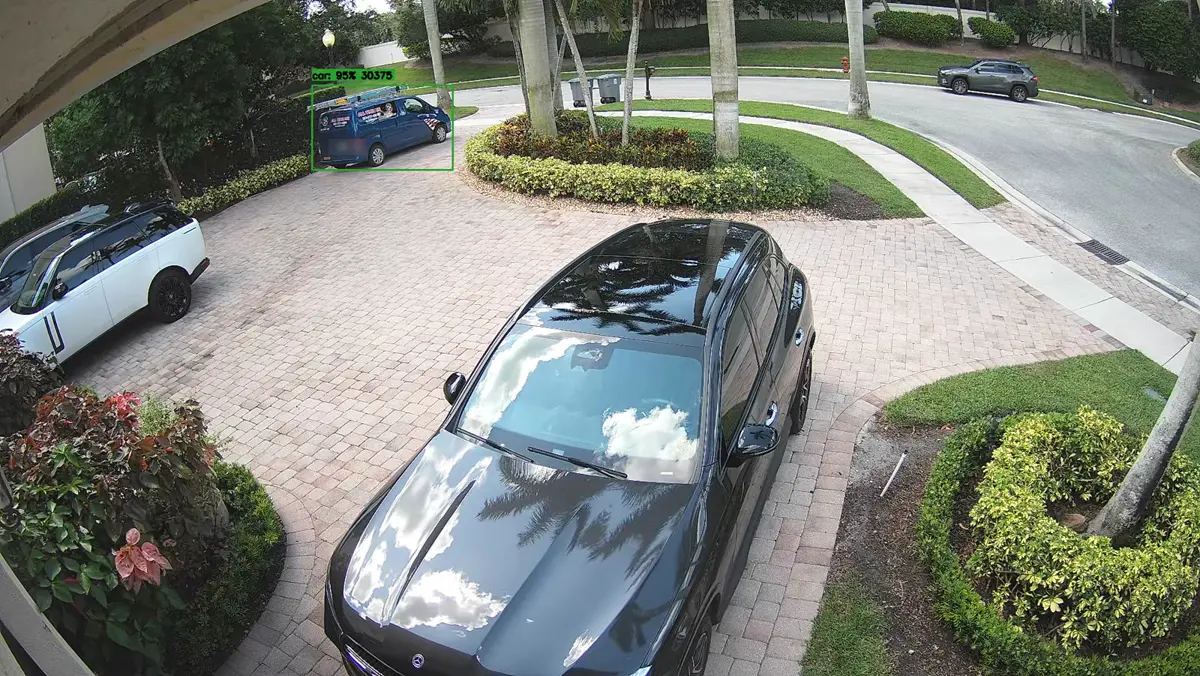
“A blue service van pulled onto the brick paved driveway entrance from the street.”
Screened, deep-reviewed, confirmed, and texted — 36 seconds after the van crossed the curb.
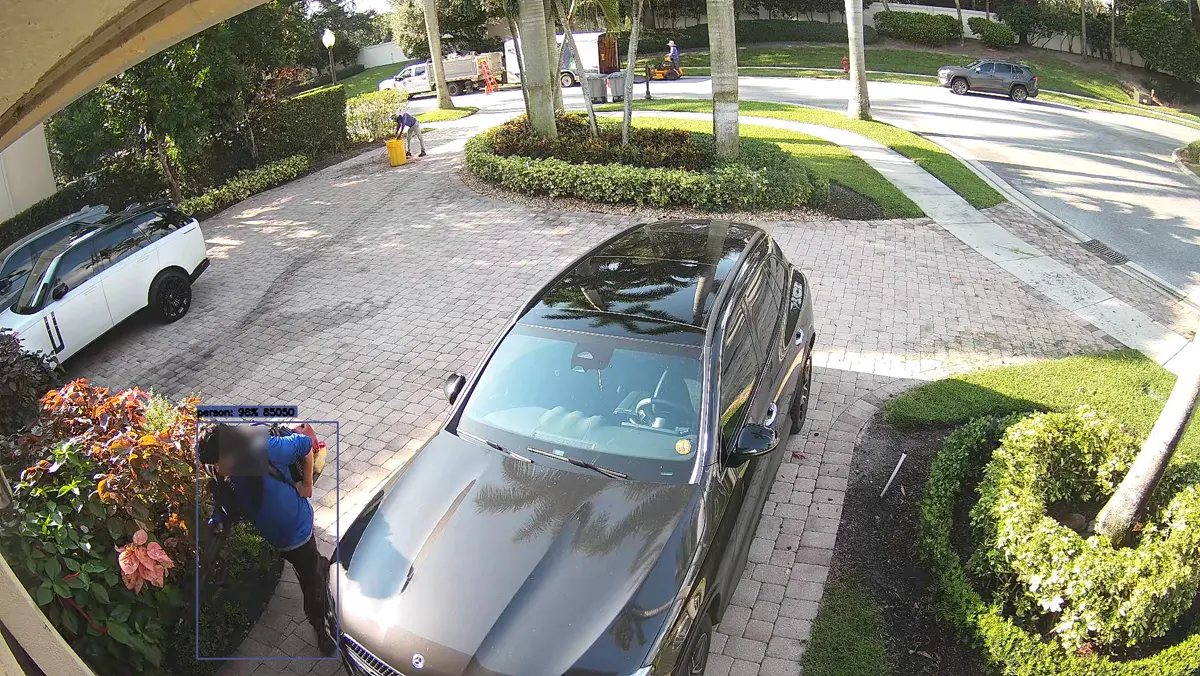
“The person carrying a leaf blower was already present on the driveway in the reference frame 23 seconds ago, when an alert was previously sent.”
The landscaping crew's arrival earned one alert. Every re-detection of the same visit was recognized and kept quiet — one visit, one notification.
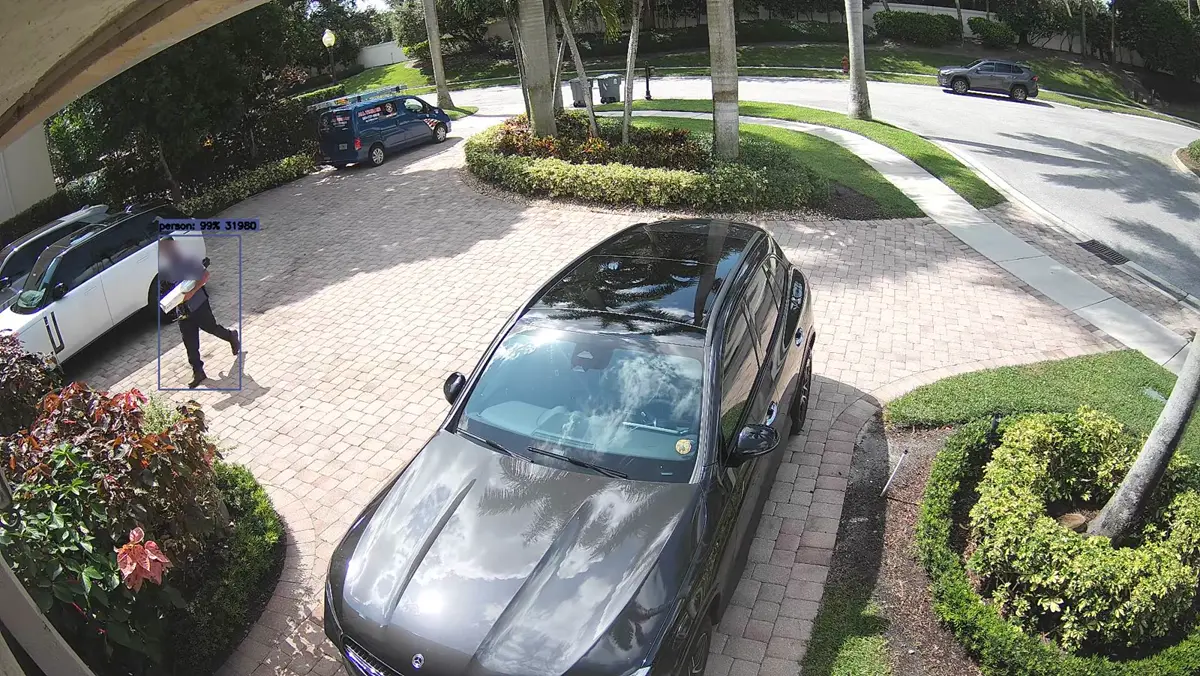
“A delivery person carrying a parcel enters and walks across the paved driveway surface.”
The first look judged it routine. The audit pass re-checked, overturned the dismissal, and sent the text. The audit can only add alerts — never remove them.
Every judgment is logged with the verdict, the reason, and the exact frames the AI looked at — so a call you disagree with can be pulled up and reviewed, not argued about.
How did this get here?
Rather than judging a frozen moment, the AI looks at the seconds leading up to the event to see how the subject arrived. At long range a single still is genuinely ambiguous — a car driving away down a distant road can look remarkably like a person standing on it. Motion settles what appearance can't: a vehicle covers ground between frames, a person moves at walking pace.
Was it here before?
Before dismissing something as scenery, the AI compares the same spot to earlier views — seconds ago, an hour ago, a day ago. Anything that was always there is part of the scene. Anything that appeared gets escalated instead of dismissed. This check is deliberately one-directional: it can rescue an alert, never suppress one. The person standing perfectly still at the edge of a camera's range is exactly who you want to hear about.
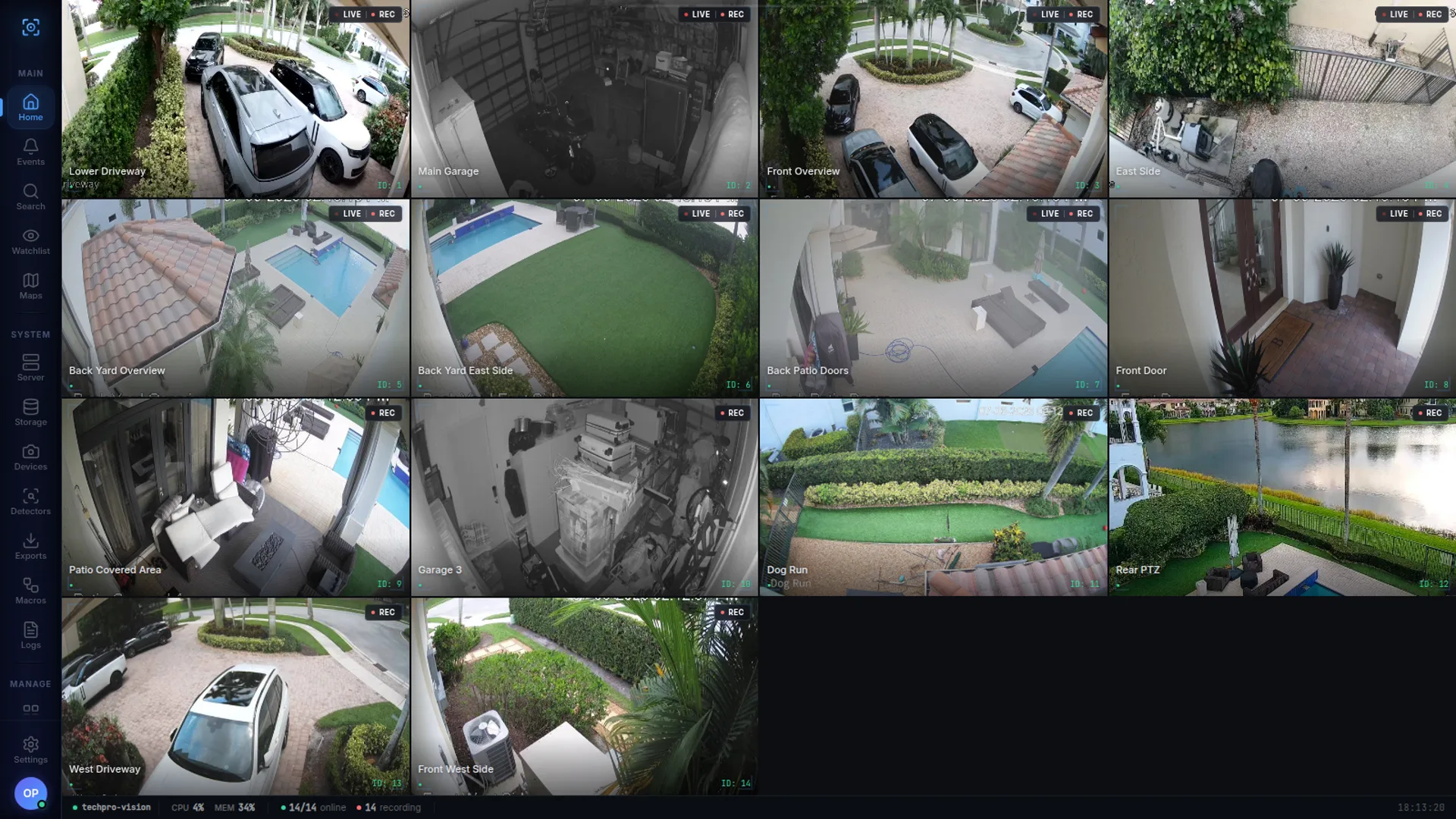
Every screenshot below is a working recorder.
Nothing staged, nothing rendered. This is a TechPro Vision system watching 14 cameras as you read this.
Click any screenshot to enlarge
One sitting, no mockups. The camera wall with its live AI event feed, the alarm queue the AI has already worked through, and a question typed to Iris — answered from the recorder's real events, clips attached. Zoomed where it matters so you can read every verdict.
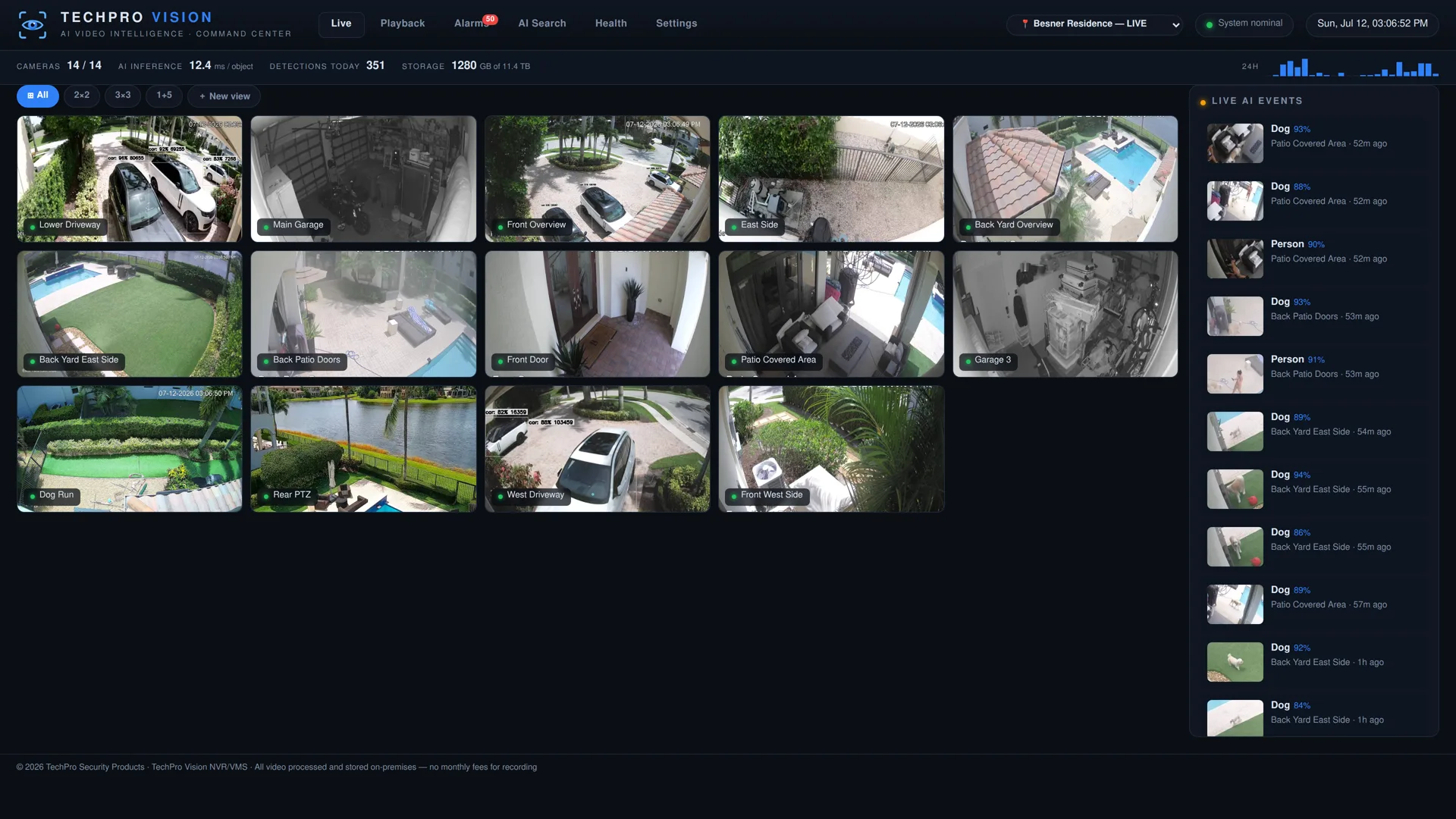
Every camera on one wall
Sub-second live video with an AI event feed running alongside — every person, vehicle, and animal detection lands in the sidebar the moment it happens.
- Custom layouts — grids, spotlight views, auto-tour cycling
- Instant replay — hover any tile for the last 60 seconds
- PTZ & audio — pan, tilt, zoom and per-camera audio from the wall
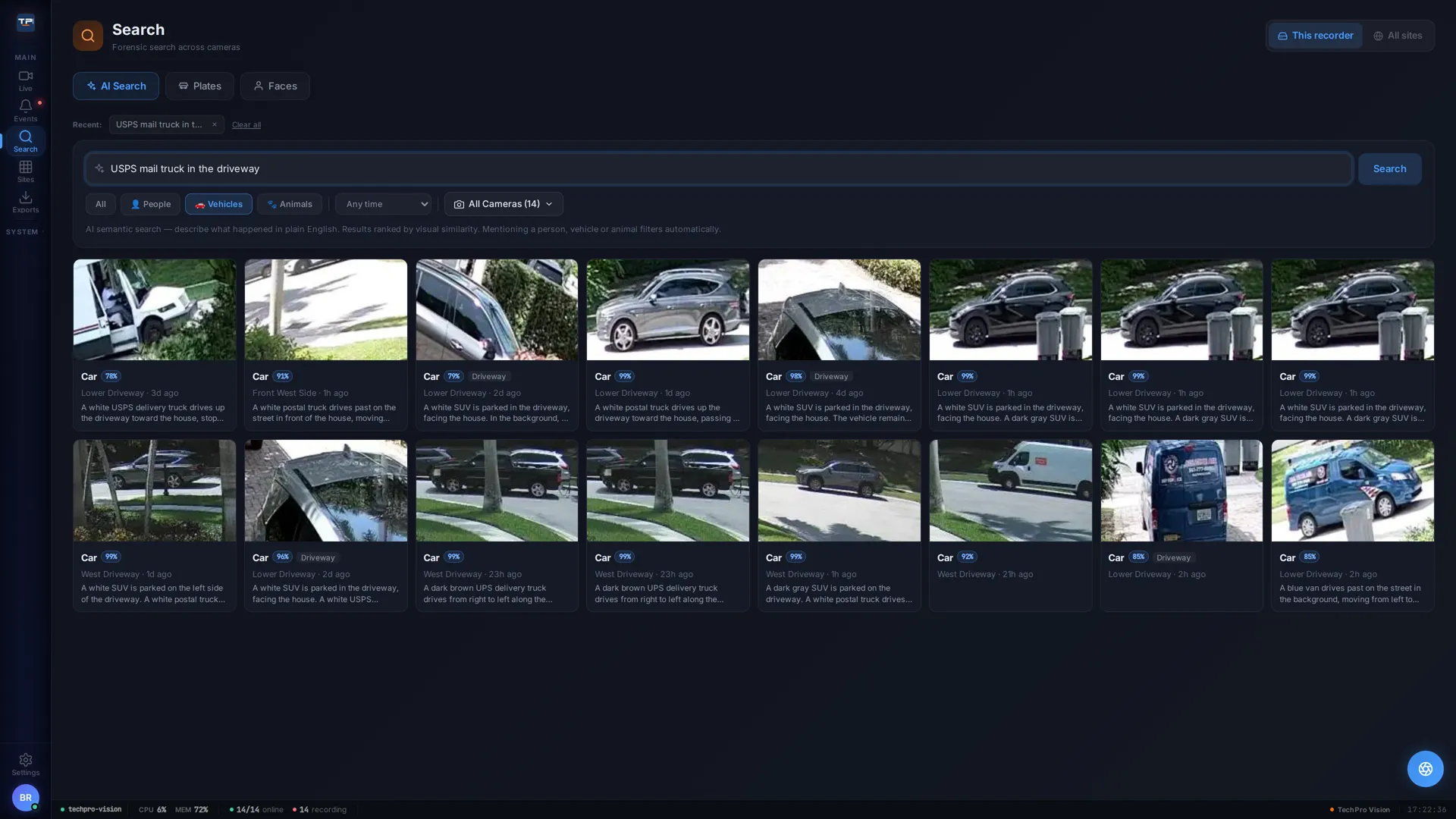
Search video like you search the web
This query was typed on the live system moments before this screenshot: the top result is the mail truck with the carrier stepping out — and the results even tell UPS from USPS.
- Plain English — “dog off leash,” “man on a bicycle,” “FedEx truck” — no scrubbing timelines
- Ranked by meaning — visual similarity plus each event's written description
- Smart filters — people, vehicles, and animals auto-detected from your query
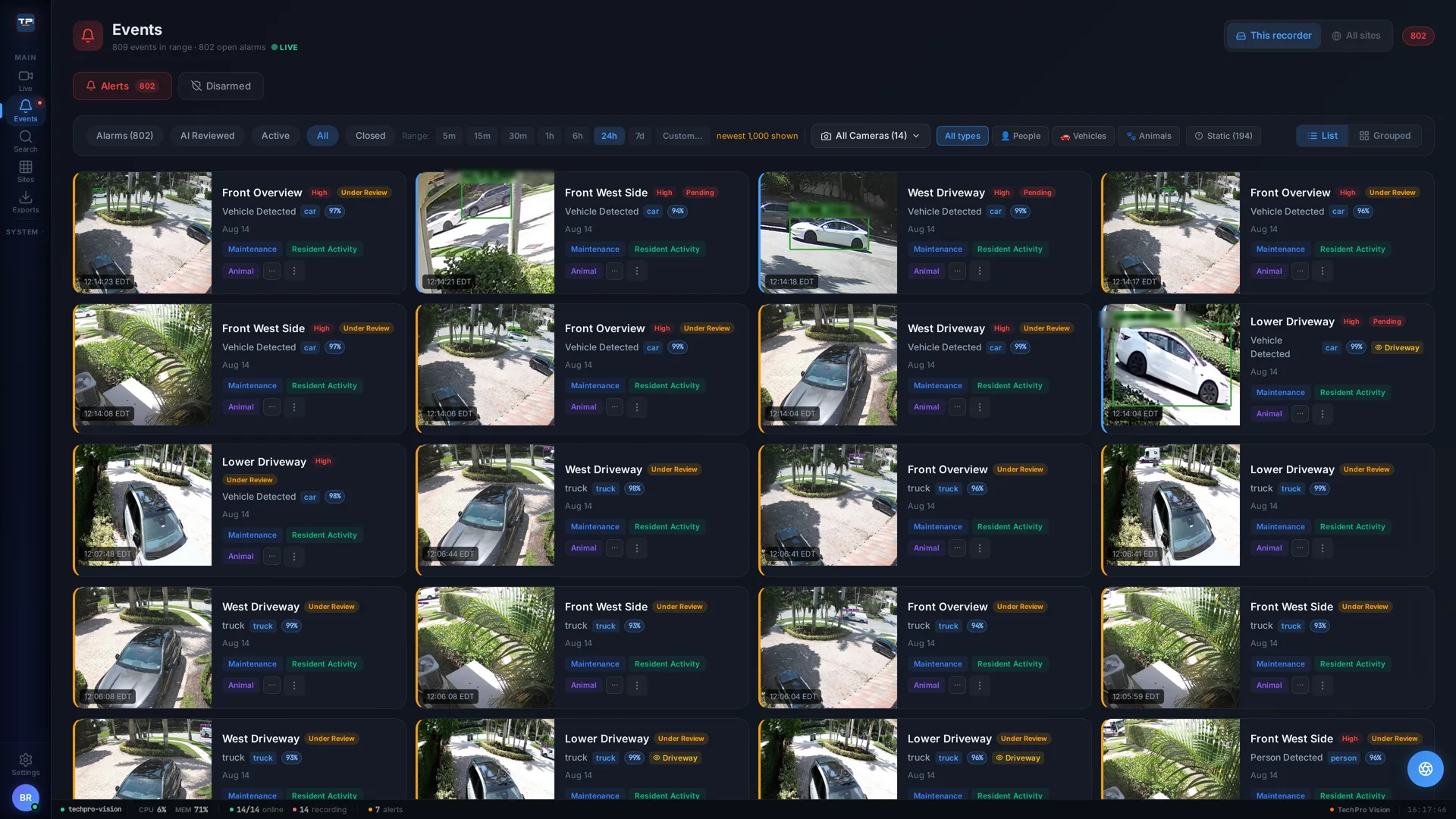
Alarms that reach you anywhere
Detections become alarms with snapshot evidence and an AI verdict attached — the queue separates what the AI verified from what it ruled out, and false alarms are demoted, never hidden.
- Zone-based rules — draw zones right on the camera view, alert on what matters
- Push, email, SMS, or voice call — escalation that matches severity, with quiet hours and per-contact schedules
- One-tap feedback — mark any alarm real or false, and the system learns your site
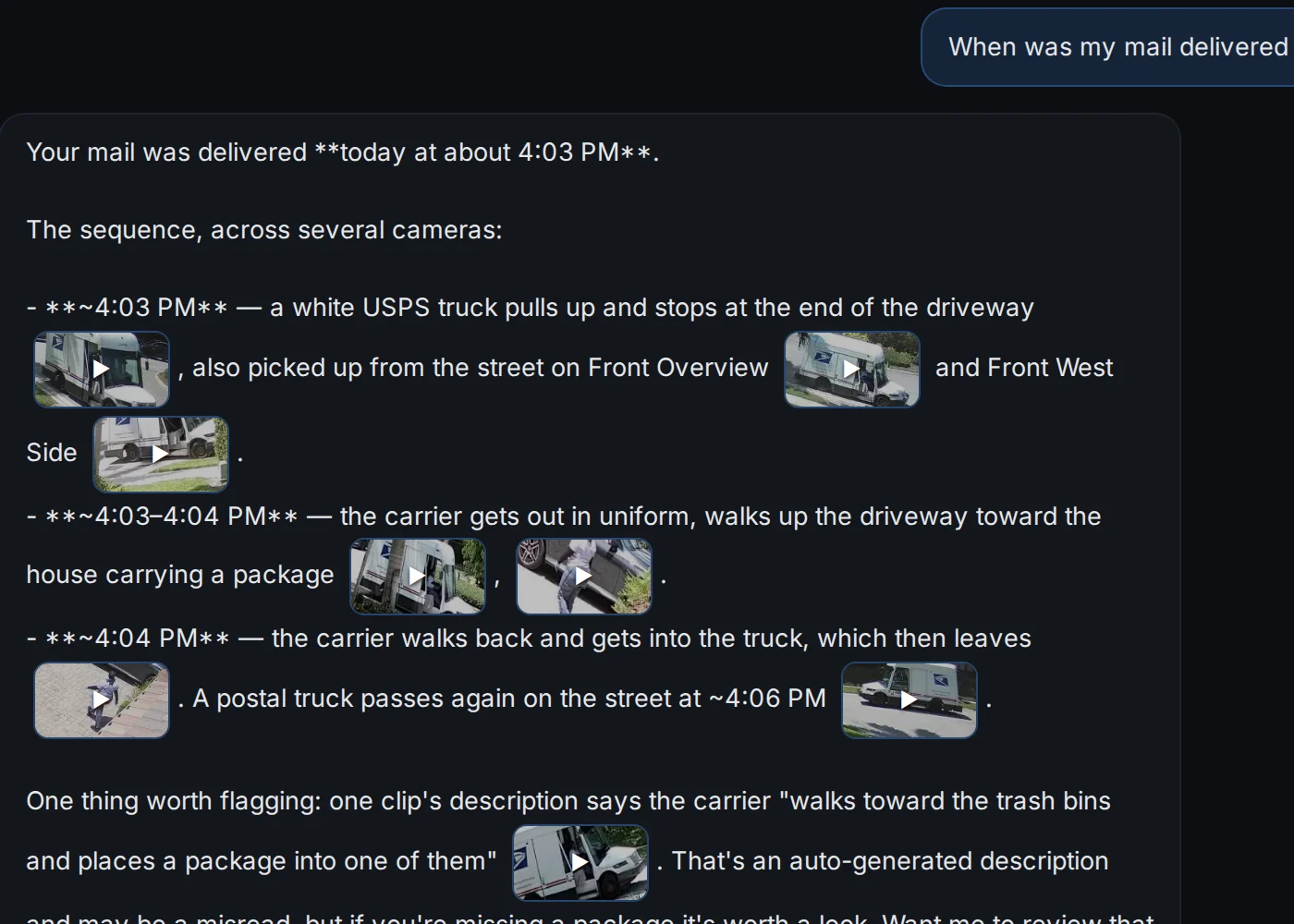
Ask the system what happened
Asked and answered on the live system: the mail came at 4:03 PM. Iris found the truck pulling up on three cameras, the carrier's walk to the house, and the departure — each moment attached as a clip.
- Grounded answers — times, cameras, and clips, not guesses
- Cross-camera — one question, every angle that saw it
- One step from action — export a clip or build an alert rule from the chat
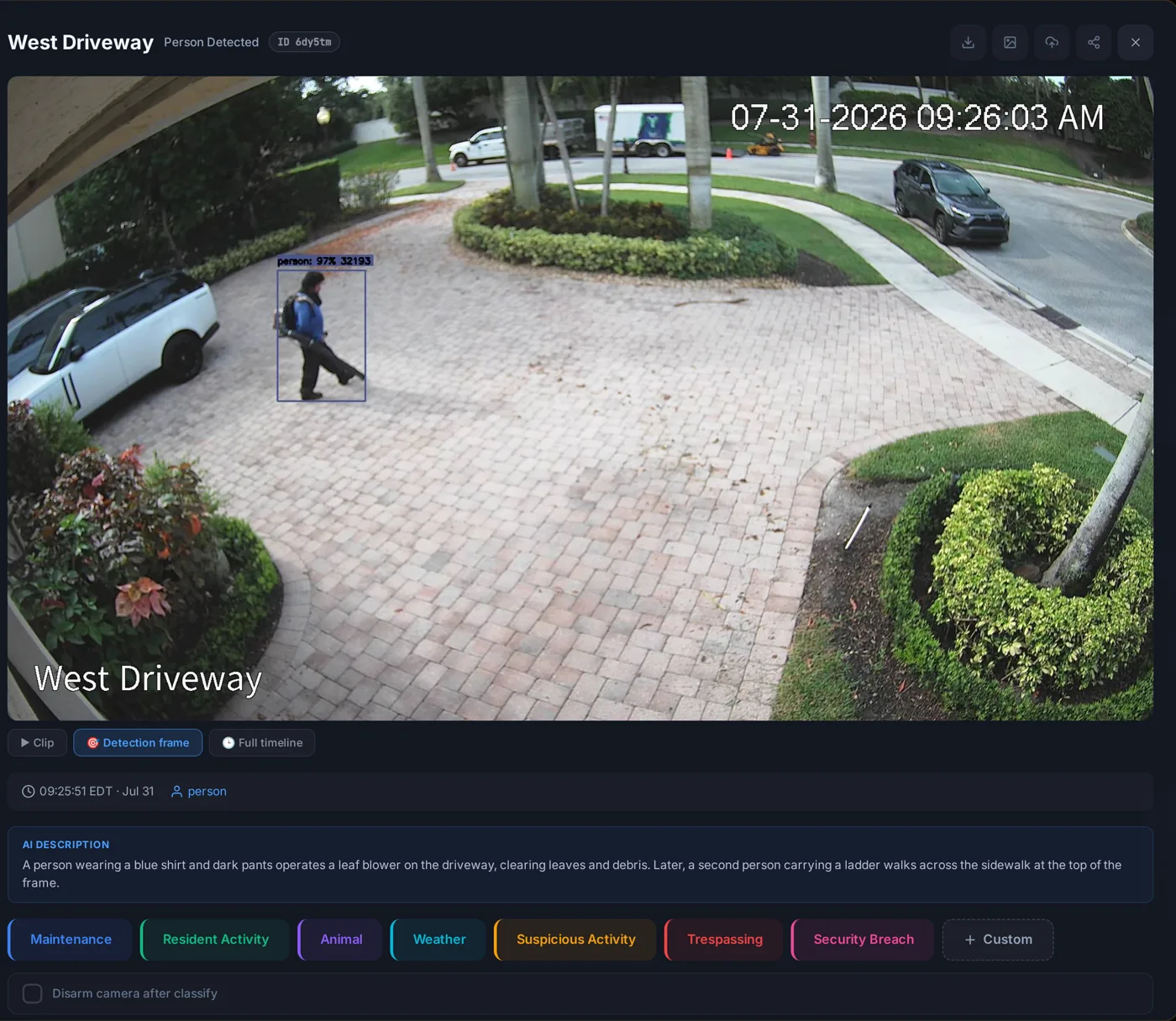
Every event, written down
Not just “person detected.” This morning's crew was described as it happened: “a person wearing a blue shirt operates a leaf blower on the driveway, clearing leaves… a second person carrying a ladder walks across the sidewalk.” Landscapers, recognized as landscapers.
- Feeds everything — descriptions power search, reports, and Iris's answers
- One-tap filing — classify events as maintenance, resident activity, suspicious, and more
- Honest records — the description is stored with the event, timestamped, exportable
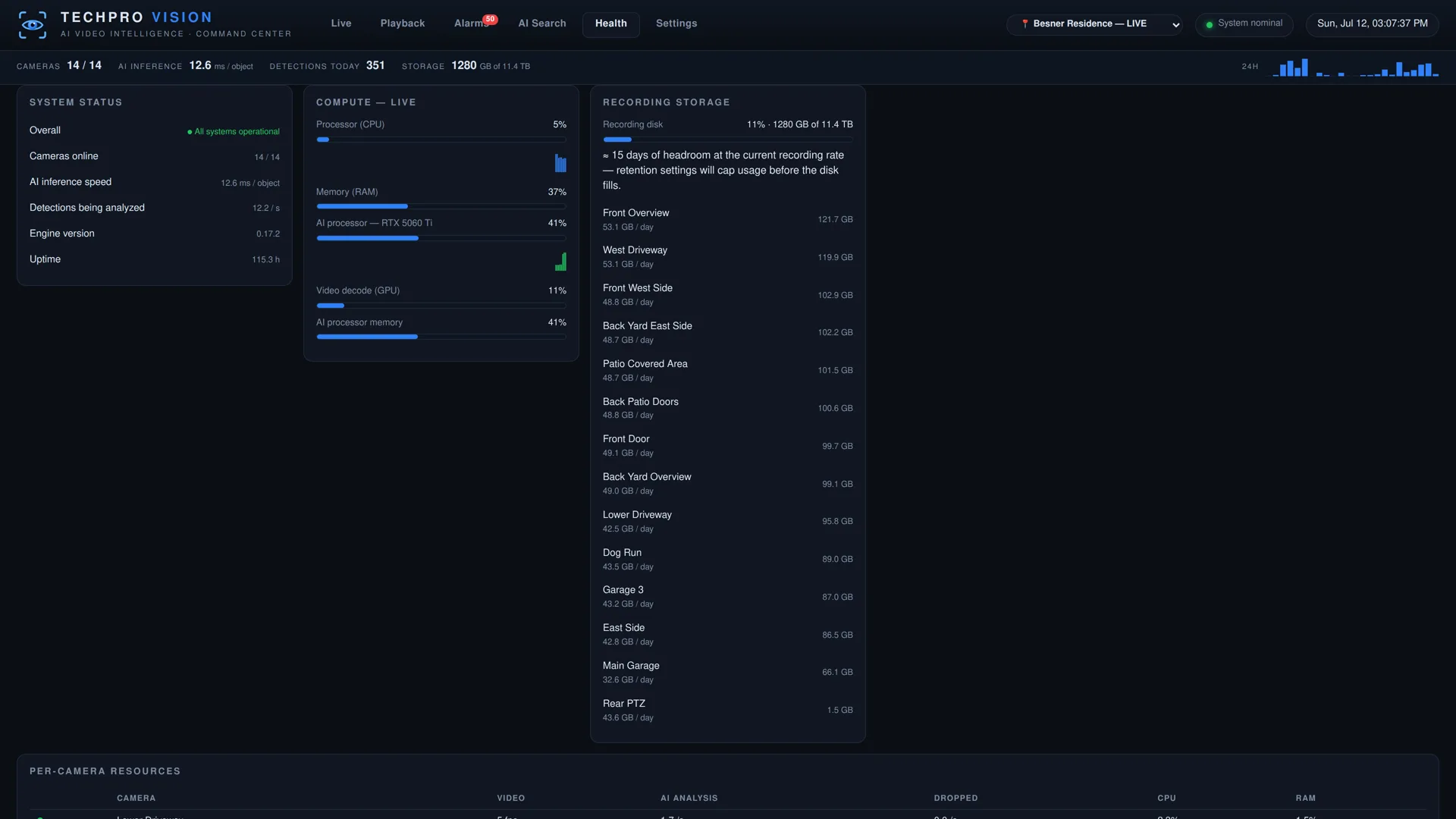
It tells you before you lose footage
Most surveillance failures are silent — a camera dies, a disk fills, and nobody notices until the day the footage matters. TechPro Vision monitors itself and tells you first.
- Camera-down & disk alerts — emailed, pushed, or called out proactively
- Recording headroom — days-remaining computed from live write rates
- Full telemetry — per-camera compute, storage, and health at a glance
A modern client on every screen
The full experience installs to any phone, tablet, or desktop straight from the browser — no app store required. Touch-native controls, pinch-to-zoom, and mobile PTZ included.
- Exports & evidence — clip exports, ZIP bundles, password-protected share links
- Audit trail — who viewed, exported, and acknowledged, with timestamps
- Watchlists, maps & multi-user roles — built for real operations
The job of a night guard,
done by software.
A good guard reviews every alarm, walks rounds, keeps a log, and can answer questions about what happened. TechPro Vision does all four — on every camera at once, without a shift change.
The morning report
Yesterday, already reviewed: an emailed recap with the day's highlights, real snapshots, and anything unusual measured against each camera's own normal baseline.
An alarm, already vetted
The van above. By the time your phone buzzed, the event had been screened and re-reviewed, and the text told you what happened in one sentence.
The rounds
Scheduled AI checks visit your cameras with every app closed — are the gates shut, is the lot empty — and speak up only when something is wrong. Each run is logged with the evidence frames it looked at.
Any question, answered
Ask Iris, the built-in assistant: “did anything come to the gate last night?” It answers from your recorder's actual events — and on command it assembles a full cross-camera timeline of an incident, with every claim cited to footage.
A camera system tells you something moved. A guard tells you whether it matters. That's the job the AI layer does — on every camera at once, without billing by the hour.
Detection on the recorder.
Judgment on demand.
Every frame is analyzed on the recorder's own GPU in about 12 milliseconds — detection, tracking, plates, faces, and search never leave the box. When an event calls for judgment — an alarm review, a written description, a question for Iris — the recorder sends just the frames needed to the TechPro Vision AI service, metered to the fraction of a cent.
Person, vehicle, animal & package detection
Accurate object detection on every camera simultaneously, with per-zone rules and confidence scores on every event.
License plate recognition
Plates are read and logged on-box on Advanced channels — searchable vehicle history without a cloud LPR subscription.
Face recognition
On-box face capture and recognition with watchlists — know when a person of interest shows up, without uploading a single frame.
Natural-language video search
Describe what happened in plain English and jump straight to the moment. Works across your entire retention window.
Iris, an assistant that knows your system
Ask questions — “did a truck come to the gate Friday?” — and get answers grounded in your recorder's actual events. Tell it what to watch for, and it builds the notification rule for you.
Incident timelines on command
“Put together what happened.” Iris follows a subject across cameras, assembles a timeline with key frames, checks prior history, and cites every claim — ready to export as an evidence bundle.
Scheduled AI reports
Daily, weekly, or monthly summaries by email: activity, alarm review, vehicle log, and system health — written for humans, not log readers.
Detection rules built for your operation
Need to know when someone isn't wearing a hard hat or safety vest? When more than five dogs are in the dog park? We build custom object detection rules around whatever your site needs to see.
Custom camera integrations
Almost any LPR, thermal, or facial-detection camera can be integrated into the platform — its detections feed the same alarms, search, and reports as every other camera.
Cloud VSaaS platforms charge per camera, per month, forever — and stream all your footage to their servers to make it work. TechPro Vision puts a GPU in the recorder for the always-on work and reserves cloud AI for moments of judgment. Your license includes an AI allowance; use beyond it is metered by the token and itemized in the portal. There are no per-camera analytics fees — you pay for judgment used, not cameras owned.
Cloud where it helps.
Never in the recording path.
The portal at techprovision.ai manages your whole fleet — every site, every recorder, every user — while video stays on your hardware. If the internet drops, recording doesn't even notice.
Remote access from anywhere
Peer-to-peer streaming straight from your recorder to your phone or desktop. Our cloud brokers the connection; your video doesn't pass through it.
Every site in one portal
All your recorders behind one login — status, health, licensing, and launch-into-app for any site you manage.
Cross-site camera walls
Build a personal wall from cameras on different recorders — “all entrances, every property” — and it follows you to every screen you sign into.
Proactive health alerts
Recorder offline, camera down, disk warnings, storage headroom — by email, SMS, or voice call, before footage is lost.
Cloud clip vault
Off-site copies of the alarm clips you choose. If the recorder is stolen or destroyed, the evidence survives.
Config backup & fast swap
Nightly encrypted configuration snapshots. A failed unit is restored onto replacement hardware in minutes, not days.
User management, per-camera
Invite users, grant specific recorders — or specific cameras — with viewer or admin roles. Access is enforced end to end.
Signed updates, on your terms
Feature releases through a controlled update channel, with critical security patches free for the life of the product.
Support & knowledge base
Open tickets from the portal, track them, and search a growing library of setup and troubleshooting guides.
Two ways to run it.
Same software, same app, same AI — you choose where it lives.
The recorder at your site
Recording, playback, and on-box AI run locally and keep working with no internet at all. Perpetual camera activations you own; the cloud layer is optional. The choice for sites that want video to stay in the building.
No server on site
A small connector links your cameras to our cloud and everything runs there — same features, same app, nothing to rack or maintain on site. The choice when you can't, or don't want to, host hardware.
No ports to open, ever
The connection is outbound-only. No port forwarding, no exposed services, nothing on your firewall for the internet to find.
Anywhere, through the portal
Sign in from any browser or phone and your cameras are there — every site, one login, no VPN to babysit.
On your network, streams stay home
When you're on site, cameras stream to your screen directly over the LAN — video doesn't ride out to the internet and back just to cross the room.
Your recordings live on your recorder, not in our cloud. When AI reviews an event, only the frames that judgment needs are sent — never stored, always metered, always itemized. The portal issues cryptographically signed licenses and the recorder obeys them even offline: a recorder that never touches the internet still records, plays back, and enforces everything you paid for, forever.
Buy it once.
It's yours.
Cloud video companies turned surveillance into a rental — stop paying and your cameras go dark. We built the opposite.
Camera activations are perpetual
Each camera channel is bought once and owned forever. Advanced channels keep license plate and face recognition running on-box for life — no subscription required.
Recording never stops
Live view, recording, playback, exports, and zone detection work with no subscription at all. That behavior is engineered into the license itself — not a policy we could quietly change.
One subscription covers the connected layer
Remote access, AI assistant, cloud alerts, feature updates, cross-site views, and support — one annual renewal per organization, every camera on the same date. It includes an AI-usage allowance; use beyond it is metered by the token, itemized in the portal, with spending caps you control.
Leaving and coming back is never punitive
Lapse for a year — or three — and reinstatement is always capped at the price of a new activation. You'll never pay a penalty for having owned the system.
How it stacks up.
| Capability | TechPro Vision | Big-brand NVR (Hikvision / Dahua) |
Cloud VSaaS (per-camera fees) |
|---|---|---|---|
| Works with any ONVIF / RTSP camera | Yes — camera-agnostic | Limited — favors own brand | Usually proprietary cameras |
| Every alarm reviewed by AI before it reaches you | Yes — with the reason in the text | No | Rare — paid add-on |
| Records without a subscription | Forever | Yes | No — stops when you stop paying |
| Video stays on-premises | Always | Yes | No — cloud-hosted |
| On-box license plate & face recognition | Included on Advanced channels | Select models, extra cost | Cloud add-on, per camera |
| Natural-language video search | Yes, on-box | No | Some vendors, cloud-side |
| AI assistant grounded in your system | Yes | No | No |
| Multi-site portal & cross-site walls | Included | Separate VMS license | Yes |
| Proactive health alerts (email/SMS/voice) | Included | Minimal | Yes |
| Still supported in the U.S. market | Built & supported in Florida | Restricted / discontinued lines | Yes |
From one building to every site you run.
Standard systems watch 16 to 32 cameras. Need more? We custom-build servers that handle hundreds of cameras in a single instance, recorders on one property federate into a single system — one wall, one event feed, one search — and the fleet portal manages hundreds or thousands of cameras across every site you run, with per-user, per-camera access control.
Homes & small business
One recorder, your existing cameras, and a phone app that actually tells you what happened — without a monthly bill just to record.
Commercial & industrial
Mixed camera fleets unified, zone rules per camera, alarm triage workflows, audit trails, and evidence exports built for real operations.
Multi-site & enterprise
Fleet-wide health monitoring, centralized users and licensing, cross-site camera walls, recorders that federate into one system per site, and recording that keeps working even when the WAN doesn't.
Built to relieve the control room.
TechPro Vision replaces the big-name enterprise video platforms — and changes what a shift actually feels like. When every alarm arrives already reviewed, with the reason attached, operators stop wading through noise and start acting on signal.
Fewer false alarms on the board
The AI reviews every alarm before an operator sees it. False alarms are demoted out of the working queue — never deleted — so the alarms that remain deserve attention.
Notifications worth reading
Guards and managers get the snapshot and a one-sentence reason — who, where, why it matters — by push, text, email, or voice call, with per-contact schedules and severity routing.
Investigations in minutes, not shifts
“Put together what happened.” Iris follows the subject across cameras, builds a timeline with every claim cited to footage, and packages it as an evidence bundle.
Hundreds to thousands of cameras
Custom-built servers run hundreds of cameras in one instance. Recorders federate into a single system per site, and the fleet portal holds every site behind one login.
Custom models & thermal
We train detection models for your site — including long-range thermal, proven on live perimeter walks past 700 feet — and build custom rules for whatever your operation needs to see.
Often, the server you already own
If the machine running your current VMS meets spec, TechPro Vision can frequently be installed on that same hardware. Tell us what you're running; we'll give you a straight answer before you buy anything.
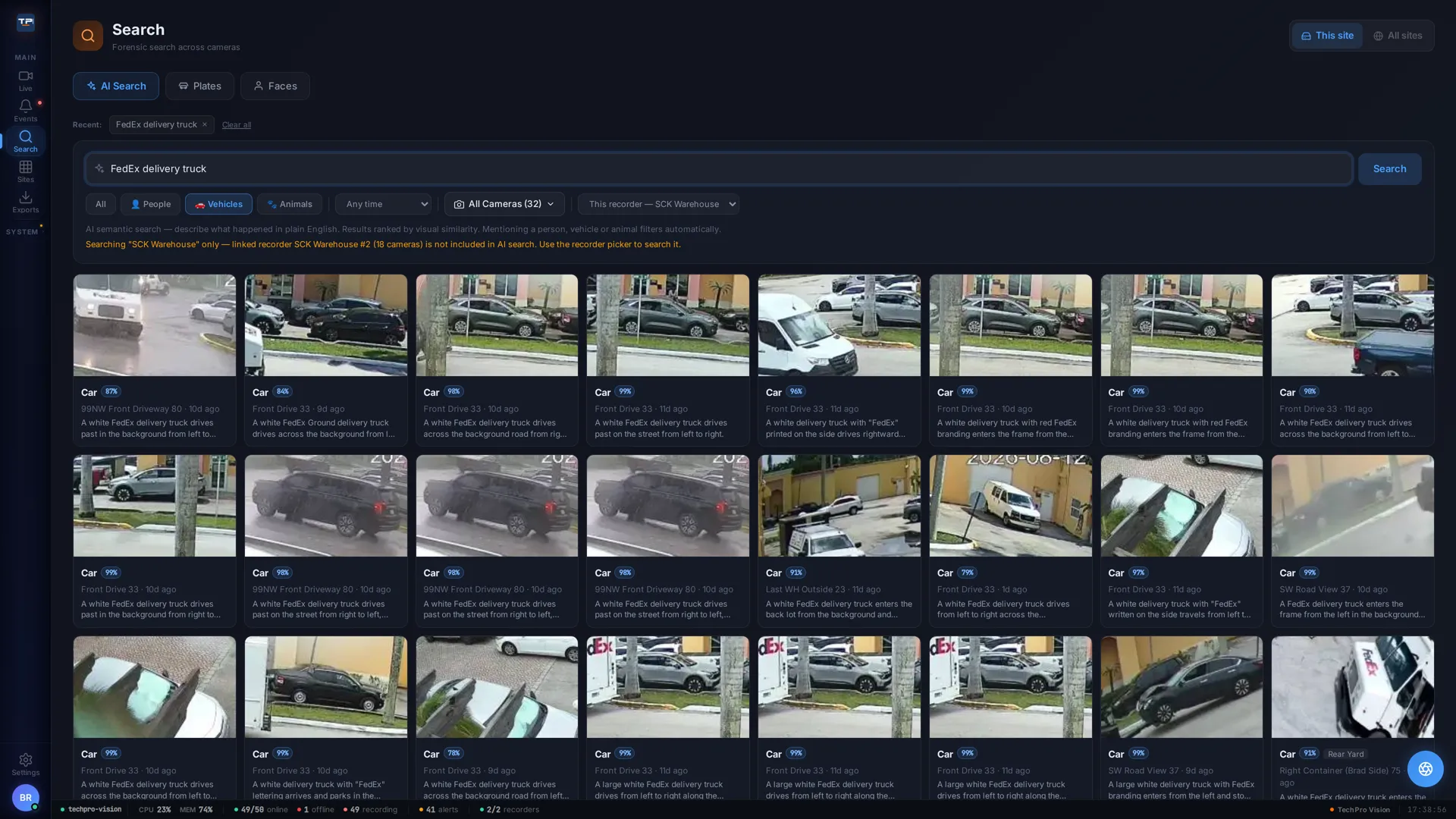
Not just houses
The same search, typed on a working commercial warehouse system watching 32 cameras: every FedEx visit across the property, told apart from FedEx Ground, each with a written description and the camera that saw it.
- Forensics at scale — one query sweeps every camera on the site
- Federated sites — linked recorders searchable from the same screen
- Same product — homes, warehouses, and estates run identical software
If your current platform charges per camera, per seat, or per analytic, this is the exit: camera-agnostic, no per-camera analytics fees, video that never leaves your building — and a migration that keeps your cameras, and often your server, exactly where they are.
FAQ
Which cameras work with TechPro Vision?
Can it replace my discontinued Hikvision or Dahua recorder?
What happens if I let the subscription lapse?
Where is my video stored?
How many cameras does one recorder support?
Can TechPro Vision replace our enterprise VMS?
Do we need new server hardware?
How do AI-reviewed alarms work?
What happens to alerts if the internet goes down?
What does AI alarm review cost?
How do I get pricing or place an order?
See it running on your cameras.
Tell us what you have — brands, camera count, sites — and we'll show you exactly what TechPro Vision would do with it. Small project or large, we'll give you a straight answer.
Email [email protected]TechPro Security Products · Boca Raton, Florida
